
Introduction
Arch Linux and CachyOS are closely related, but they are not the same kind of distribution.
Arch Linux is an independently developed, minimalist, rolling-release Linux distribution for x86-64 systems. Its philosophy is centered around simplicity, user control, and building your own system from a minimal base. The official Arch description says that Arch is installed as a minimal base system and then configured by the user according to their own needs. (Arch Linux)
CachyOS, on the other hand, is an Arch-based distribution focused on performance, responsiveness, optimized packages, tuned kernels, and a more convenient installation experience. Its own project description presents it as a performance-optimized Arch-based distribution with CPU-specific package builds, advanced kernel scheduling, and an easier installation path. (cachyos.org)
So the simplified version is:
Arch Linux = build your own system from a clean, minimal base.

CachyOS = Arch-based system with performance tuning, optimized repositories,
custom kernels, and a more polished out-of-the-box experience.
Both are excellent distributions, but they target slightly different users.
1. What Arch Linux and CachyOS Have in Common
1.1 Both are rolling-release distributions
Both Arch Linux and CachyOS follow the rolling-release idea. Instead of waiting for large version upgrades every few months or years, users continuously update their systems.
On Arch Linux, an existing system can always be updated with:
sudo pacman -Syu
The official Arch download page explicitly states that existing Arch systems can be updated with pacman -Syu. (Arch Linux)
CachyOS follows the same general rolling-release model because it is based on Arch Linux and uses Arch-style package management. Its website also describes it as offering the same rolling-release flexibility expected from Arch. (cachyos.org)
This means both distributions give you:
Recent kernels
Recent desktop environments
Recent Mesa graphics stack
Recent developer tools
Recent application packages
Continuous updates instead of major release upgrades
The benefit is freshness. The tradeoff is that you need to maintain your system responsibly.
1.2 Both use pacman
Both distributions use pacman, the package manager associated with Arch Linux.
Pacman is one of the major distinguishing features of Arch Linux. It combines a simple binary package format with the Arch build system and keeps systems up to date by synchronizing package lists with servers. (Arch Linux Wiki)
A typical update looks the same on both systems:
sudo pacman -Syu
Installing a package also looks familiar:
sudo pacman -S firefox
Removing a package:
sudo pacman -Rns firefox
Searching for a package:
pacman -Ss dotnet
This shared package management foundation is one of the reasons why experienced Arch users can usually understand CachyOS very quickly.
1.3 Both can use the Arch User Repository
The Arch User Repository, or AUR, is a community-driven repository for Arch Linux users. It contains PKGBUILD files that allow users to compile and install packages with makepkg and then install them via pacman. (Arch Linux Wiki)
In practice, this gives both Arch and CachyOS users access to a huge ecosystem of software that may not be available in the official repositories.
Typical AUR use cases include:
Developer tools
Niche applications
Proprietary software launchers
Git versions of packages
Older or alternative package versions
Custom patched packages
However, AUR packages are community-maintained. That means users should inspect PKGBUILD files, especially for sensitive or security-relevant software.
1.4 Both require a certain amount of Linux knowledge
CachyOS is easier to install and more preconfigured than plain Arch, but it is still Arch-based. That means it inherits many Arch-like expectations:
You should understand pacman.
You should read update messages.
You should know how to troubleshoot package conflicts.
You should understand basic Linux system administration.
You should be comfortable with terminal commands.
The CachyOS FAQ itself says that its FAQ applies to CachyOS and Arch-based distributions, and it explicitly notes that it is not meant to replace the Arch Linux Wiki. (CachyOS)
That is an important point: CachyOS is friendlier than Arch, but it is not the same kind of “install and forget” distribution as Linux Mint, Ubuntu LTS, or Fedora Workstation.
2. The Core Difference: Philosophy
Arch Linux philosophy
Arch Linux is about user control, minimalism, transparency, and simplicity. The Arch project describes itself as a versatile and simple distribution designed for competent Linux users. It is meant to be taken in any direction the user wants. (Arch Linux)
A default Arch installation is intentionally minimal.
You decide:
Which kernel to install
Which desktop environment to use
Which bootloader to use
Which services to enable
Which file system to use
Which display manager to use
Which applications to install
How much automation you want
Arch does not try to guess your preferences.
That is its strength.
It is also what makes it intimidating for beginners.
CachyOS philosophy
CachyOS starts from Arch but adds a performance-focused layer on top.
Its project description highlights CPU-specific package builds, advanced kernel scheduling, optimized repositories, and an easier installation experience. (cachyos.org)
CachyOS tries to answer a different question:
What if we keep the Arch base, but add aggressive performance tuning,
optimized packages, custom kernels, and a polished installer?
That makes CachyOS attractive for:
Gaming systems
Modern desktops
High-performance laptops
Workstations
Users who want Arch benefits without doing every setup step manually
But it also means CachyOS is more opinionated than Arch.
3. Installation Experience
Arch Linux installation
Arch Linux can be installed manually by following the ArchWiki installation guide. The official guide describes installing Arch from a live system booted from an official installation image. (Arch Linux Wiki)
A manual Arch installation typically involves steps such as:
Partitioning disks
Formatting file systems
Mounting partitions
Installing the base system
Generating fstab
Chrooting into the new system
Setting locale
Configuring hostname
Installing bootloader
Installing network tools
Creating users
Installing desktop environment manually
Arch also provides archinstall, a guided installer. The ArchWiki describes archinstall as a helper library packaged with preconfigured installers, including a guided installer. (Arch Linux Wiki)
So Arch is no longer purely manual-only, but the classic Arch experience is still much more hands-on than CachyOS.
CachyOS installation
CachyOS provides a graphical installer based on Calamares. Its installer changelog references Calamares and desktop selection improvements, including support for desktop previews and hardware-related installation improvements. (CachyOS)
CachyOS also offers multiple desktop choices during installation. The CachyOS documentation says users can choose from several desktop environments and should select only one during installation. (CachyOS)
However, CachyOS has one important requirement: its installer uses an online installation process, so a stable and reasonably fast internet connection is mandatory. (CachyOS)
That means:
Arch can be installed in a very manual, controlled way.
CachyOS is faster and friendlier to install, but depends more on the installer workflow and internet availability.
4. Package Optimization
This is one of the biggest technical differences.
Arch Linux packages
Arch Linux provides general-purpose x86-64 packages. The official Arch description calls it an independently developed x86-64 general-purpose GNU/Linux distribution. (Arch Linux)
That is good for compatibility.
Arch packages are built to work broadly across supported x86-64 systems. This makes Arch predictable and relatively conservative in terms of CPU-specific optimization.
CachyOS packages
CachyOS provides optimized repositories. Its website states that CachyOS ships packages optimized for CPUs with builds such as x86-64-v3, x86-64-v4, and Zen4, and also mentions techniques such as LTO and PGO. (cachyos.org)
The CachyOS optimized repository documentation says its script detects the CPU instruction sets available on the system and installs the repository version most optimized for that CPU. (CachyOS)
In practical terms:
Arch focuses on broad compatibility.

CachyOS focuses on extracting more performance from modern CPUs.
This can matter for:
Compilation workloads
Gaming
Desktop responsiveness
Multimedia workloads
Scientific workloads
CPU-heavy development environments
But there is also a tradeoff: more optimization means more complexity, and in rare cases, optimized packages or patched kernels can introduce behavior that differs from upstream Arch.
5. Kernel Strategy
Arch Linux kernel approach
Arch Linux gives users a clean base and lets them choose. You can use:
linux
linux-lts
linux-zen
linux-hardened
custom kernels
AUR kernels
self-compiled kernels
Arch does not force a performance-tuned kernel profile on you.
This makes it flexible and transparent.
CachyOS kernel approach
CachyOS puts much more emphasis on kernel tuning. Its homepage mentions a custom kernel with a tuned scheduler. (cachyos.org)
The CachyOS kernel repository states that CachyOS kernels are available in several architecture optimizations, including x86-64, x86-64-v3, x86-64-v4, and znver4, and that scheduler variants are optimized for different use cases. (GitHub)
This is a major reason why users choose CachyOS.
For example, a gamer or workstation user may prefer a tuned CachyOS kernel because the goal is better responsiveness or throughput out of the box.
But for servers, conservative systems, or users who want the most upstream-like Arch behavior, plain Arch may be preferable.
6. Desktop Experience
Arch Linux desktop experience
Arch gives you a blank canvas.
You can install:
KDE Plasma
GNOME
Xfce
LXQt
Hyprland
Sway
i3
bspwm
Cinnamon
MATE
No desktop at all
But you configure most things yourself.
That includes:
Display manager
Audio stack
Bluetooth
Printing
Network management
Fonts
Theming
Power management
GPU drivers
Flatpak support
Firewall
This is ideal if you want full control.
It is less ideal if you simply want a ready-to-use desktop quickly.
CachyOS desktop experience
CachyOS gives you a more polished desktop installation path. Its documentation says the installer offers several desktop environments, and the choice depends on personal preference. (CachyOS)
This makes CachyOS feel more accessible.
You still get an Arch-based system, but with more decisions handled during installation.
For many users, that is the sweet spot:
Arch package ecosystem
Rolling release
Performance optimizations
Graphical installer
Preconfigured desktop
Less manual setup
7. Gaming and Handheld Devices
This is an area where CachyOS has a clear identity.
CachyOS offers a dedicated Handheld Edition. The official download page says the Handheld Edition provides a GameMode-like experience, comes with preinstalled gaming tools, and officially supports devices such as the ROG Ally, Steam Deck OLED/LCD, Legion Go, and Lenovo Legion Go S. (cachyos.org)
The CachyOS Handheld documentation describes it as offering a SteamOS-like experience with Game Mode switching and preinstalled gaming applications. It also says the Handheld Edition uses the LAVD scheduler by default, optimized for handheld devices, with the goal of improving frame rates and battery life during gaming. (CachyOS)
Arch Linux can absolutely be turned into a gaming system.
You can install:
Steam
Proton
Lutris
Heroic Games Launcher
Gamescope
MangoHud
gamemode
Mesa-git
custom kernels
But you assemble that setup yourself.
CachyOS gives gaming-focused users a much faster path.
8. Maintenance and Stability
Arch Linux maintenance model
Arch is rolling release and expects users to keep their systems updated correctly.
This means:
Read Arch news.
Avoid partial upgrades.
Understand pacman output.
Handle manual interventions when required.
Know how to recover from broken packages or boot issues.
Arch is not unstable by design, but it is fast-moving.
The benefit is that you get fresh software.
The cost is that you are responsible for keeping your system healthy.
CachyOS maintenance model
CachyOS inherits the same rolling-release nature but adds its own repositories, kernels, tools, and configuration choices.
The CachyOS FAQ advises users to stay alert to official announcements on the forum, Reddit, Discord announcements, and repository update channels regarding known issues or updates that require manual intervention. (CachyOS)
That means CachyOS users should monitor both:
Arch-related update behavior
CachyOS-specific announcements
In other words, CachyOS can be easier to install and faster out of the box, but it is not necessarily maintenance-free.
9. Pros and Cons of Arch Linux
Pros
1. Maximum control
Arch gives you a minimal system and lets you build exactly what you want.
That is ideal for users who dislike unnecessary defaults.
2. Excellent documentation
The ArchWiki is one of the strongest Linux documentation resources available. The ArchWiki main page describes itself as the source for Arch Linux documentation on the web. (Arch Linux Wiki)
Even non-Arch users often rely on ArchWiki articles.
3. Clean upstream-oriented experience
Arch usually stays close to upstream projects.
That makes it easier to understand what is actually installed and configured.
4. Great learning distribution
If you want to understand Linux deeply, Arch is one of the best choices.
You learn about:
Bootloaders
File systems
Mount points
Systemd
Networking
Package management
Desktop components
Kernel choices
System recovery
5. Flexible for desktops, laptops, servers, and workstations
Arch is not limited to one use case. The official Arch description calls it versatile and suitable for both servers and workstations for competent Linux users. (Arch Linux)
Cons
1. Higher learning curve
Arch expects you to read, understand, and configure.
That is powerful, but it can frustrate users who want a guided experience.
2. More manual setup
A fully working desktop may require installing and configuring many pieces manually.
For example:
NetworkManager
PipeWire
Bluetooth
Printing
GPU drivers
Fonts
Display manager
Power profiles
Firewall
3. More responsibility
Arch does not hide complexity.
If an update needs manual intervention, you are expected to understand and apply it.
4. Not ideal for users who want convenience first
If your priority is “install it and start working immediately,” plain Arch may not be the best fit.
10. Pros and Cons of CachyOS
Pros
1. Easier installation
CachyOS provides a graphical installer and several desktop options. This makes it much easier to get started than a traditional manual Arch installation. (CachyOS)
2. Strong performance focus
CachyOS ships optimized packages and custom kernels. Its project page highlights CPU-specific builds, LTO, PGO, and custom kernel scheduling. (cachyos.org)
For many users, this is the main selling point.
3. Better out-of-the-box desktop experience
CachyOS gives you a more complete desktop setup from the beginning.
This is especially useful for users who want Arch-like freshness without spending hours on initial configuration.
4. Interesting choice for gaming
The Handheld Edition and gaming-related defaults make CachyOS especially attractive for gaming devices and performance-focused desktop gaming. (cachyos.org)
5. Still close to Arch
CachyOS is not a completely separate ecosystem like Fedora, Ubuntu, or openSUSE.
It remains Arch-based, uses pacman, and can benefit from much of the Arch knowledge ecosystem.
Cons
1. More opinionated than Arch
CachyOS makes more decisions for you:
Optimized repositories
Custom kernels
Tuned schedulers
Preconfigured installer choices
CachyOS-specific tools
That is convenient, but it is less minimal than Arch.
2. More moving parts
Performance optimization adds complexity.
If something behaves unexpectedly, you may need to consider:
Is this an Arch issue?
Is this a CachyOS repository issue?
Is this related to the custom kernel?
Is this related to a scheduler choice?
Is this related to optimized packages?
With plain Arch, the stack is often simpler to reason about.
3. Requires internet during installation
CachyOS uses an online installation process, and the documentation says a stable and reasonably fast internet connection is mandatory. (CachyOS)
That can be a disadvantage in poor network environments.
4. Not the best choice for learning Arch from first principles
You can learn a lot with CachyOS, but it does not force you to understand every installation step.
If your goal is to learn how an Arch system is assembled from the ground up, plain Arch is better.
5. Smaller ecosystem than upstream Arch
Arch Linux itself has a larger and older community, more documentation, and more direct upstream support.
CachyOS users can use Arch resources, but some issues may be CachyOS-specific.
11. Direct Feature Comparison
| Area | Arch Linux | CachyOS |
|---|---|---|
| Base | Independent distribution | Arch-based distribution |
| Philosophy | Minimal, user-centric, DIY | Performance-focused, optimized, convenient |
| Installation | Manual or archinstall guided installer | Graphical Calamares-based installer |
| Default system | Minimal base | More preconfigured |
| Package manager | pacman | pacman |
| Repositories | Official Arch repos | Arch base plus CachyOS optimized repos |
| Package optimization | General x86-64 | CPU-specific optimized builds such as x86-64-v3/v4 and Zen4 |
| Kernel | User chooses kernel | CachyOS provides tuned/custom kernels |
| Desktop setup | User builds manually | Desktop choices during installation |
| Gaming | Excellent if configured manually | Stronger out-of-the-box gaming focus |
| Handheld support | Possible manually | Dedicated Handheld Edition |
| Learning value | Very high | Moderate to high |
| Convenience | Lower | Higher |
| Control | Maximum | High, but more opinionated |
| Best for | Advanced users, learners, minimalists | Gamers, desktop users, performance-focused users |
12. Which Distro Is Better for Which User?
Choose Arch Linux if…
Arch Linux is the better choice if you:
Want to understand Linux deeply
Want full control over every component
Prefer minimalism over convenience
Want to build your own system from the ground up
Prefer upstream defaults
Want the strongest ArchWiki-aligned experience
Are comfortable reading documentation
Are comfortable troubleshooting manually
Arch is especially suitable for:
Linux enthusiasts
Developers who like minimal systems
System administrators
Power users
Tinkerers
Users who want to learn Linux internals
Users who dislike preconfigured distributions
For example, if you want a minimal Hyprland setup with only the packages you explicitly choose, Arch is probably the better fit.
Choose CachyOS if…
CachyOS is the better choice if you:
Want an Arch-based system but easier installation
Care about desktop responsiveness
Want optimized packages and kernels
Use modern AMD or Intel hardware
Want a faster path to a gaming-ready system
Want a polished desktop quickly
Like Arch but do not want to configure every detail manually
CachyOS is especially suitable for:
Gamers
Desktop users
Laptop users with modern hardware
Performance enthusiasts
Users moving from Manjaro, EndeavourOS, or Garuda
Users who want Arch-like freshness with more convenience
Handheld gaming users
If your goal is to install a fast, modern, Arch-based desktop on a gaming laptop or desktop PC, CachyOS is very compelling.
Avoid Arch Linux if…
Arch may be the wrong choice if you:
Do not want to read documentation
Do not want to maintain a rolling-release system
Need a very conservative production desktop
Need long-term package stability above freshness
Want everything configured automatically
Are new to Linux and easily frustrated by terminal work
Arch is not difficult because it is badly designed. It is difficult because it deliberately gives responsibility to the user.
Avoid CachyOS if…
CachyOS may be the wrong choice if you:
Want a completely minimal system
Want the most upstream Arch-like experience
Prefer conservative defaults
Use very old hardware
Need maximum predictability over performance tuning
Do not want distribution-specific kernels or repositories
Want to learn Arch installation from first principles
CachyOS is also not ideal if you need a boring, slow-moving system for mission-critical production workloads. For that, a stable-release distribution such as Debian, Ubuntu LTS, Rocky Linux, or openSUSE Leap may be more appropriate.
13. Performance: Is CachyOS Always Faster?
Not always.
CachyOS is designed for better performance, and its optimized repositories and tuned kernels can absolutely make a difference, especially on modern hardware. Its official description emphasizes CPU-specific package builds, LTO, PGO, and custom kernel scheduling. (cachyos.org)
But performance depends on the workload.
You may notice improvements in:
Game frame pacing
Desktop responsiveness
Compilation
Compression
Certain CPU-heavy workloads
Certain kernel-scheduler-sensitive workloads
You may notice little difference in:
Basic web browsing
Text editing
Simple office work
Older hardware limited by disk speed or memory
GPU-bound games
Network-bound workloads
In other words:
CachyOS can be faster.
Arch can be just as fast if manually tuned.
The difference depends heavily on hardware and workload.
14. Stability: Is Arch More Stable Than CachyOS?
This depends on what we mean by “stable.”
If stable means:
Packages do not change often
APIs remain fixed
Major versions are frozen
Updates are conservative
then neither Arch nor CachyOS is the ideal choice, because both are rolling-release systems.
If stable means:
The system behaves predictably when maintained correctly
The user understands updates
The package ecosystem is coherent
then Arch can be very reliable.
CachyOS adds performance-focused changes, optimized packages, and custom kernels. That can improve the user experience, but it also adds more variables.
So the practical answer is:
Arch is simpler and closer to upstream.
CachyOS is more optimized and more convenient.
Both can be reliable if maintained properly.
Neither is a classic conservative stable-release distribution.
15. My Practical Recommendation
For a developer workstation
Choose Arch Linux if you want a minimal, fully controlled development environment.
Choose CachyOS if you want an Arch-based workstation with a faster setup and potentially better responsiveness.
For .NET, Rust, Go, Python, Java, Docker, Kubernetes tools, and editor-based workflows, both can work very well.
For gaming
Choose CachyOS first.
Its performance focus, custom kernels, optimized packages, and Handheld Edition make it especially attractive for gaming. (cachyos.org)
Choose Arch Linux if you want to build your gaming stack manually and understand every piece.
For learning Linux
Choose Arch Linux.
CachyOS is easier to install, but Arch teaches you more.
Arch forces you to understand the system.
That is frustrating at first, but valuable long term.
For older hardware
Choose carefully.
Arch can be made extremely lightweight because you decide exactly what to install.
CachyOS is performance-focused, but some of its CPU-specific optimizations are most useful on modern processors. Its optimized repository model detects CPU instruction sets and selects optimized repository variants accordingly. (CachyOS)
For very old hardware, a lightweight Arch installation, Debian with Xfce, antiX, MX Linux, or Alpine may be more suitable.
For production servers
Usually choose Arch Linux only if you explicitly want rolling release on a server and know how to maintain it.
CachyOS is primarily interesting for desktops, gaming, workstations, and performance-focused personal systems.
For conservative production servers, I would usually prefer Debian, Ubuntu LTS, AlmaLinux, Rocky Linux, or openSUSE Leap over both Arch and CachyOS.
Summary
CachyOS and Arch Linux share the same family tree, package manager, rolling-release model, and access to the broader Arch ecosystem. Both use pacman, both can benefit from the AUR, and both reward users who understand Linux maintenance.
But they are built around different priorities.
Arch Linux is the purer, more minimal, more user-controlled distribution. It gives you a clean base and expects you to build the system you want. It is excellent for learning, customization, minimal desktops, power users, and people who want to stay close to upstream Arch.
CachyOS is the more performance-oriented and convenience-focused option. It takes the Arch base and adds optimized repositories, CPU-specific builds, custom kernels, a graphical installer, desktop choices, and gaming-oriented features. It is excellent for modern desktops, gaming PCs, laptops, and users who want an Arch-like experience without doing every setup step manually.
The choice is not about which distribution is objectively better.
It is about what you value more:
Choose Arch Linux if you want maximum control, minimalism, and learning.

Choose CachyOS if you want Arch-based speed, convenience, and performance tuning.
A simple final rule:
If you want to build the system yourself, choose Arch.

If you want a fast Arch-based system that is already tuned for you,
choose CachyOS.
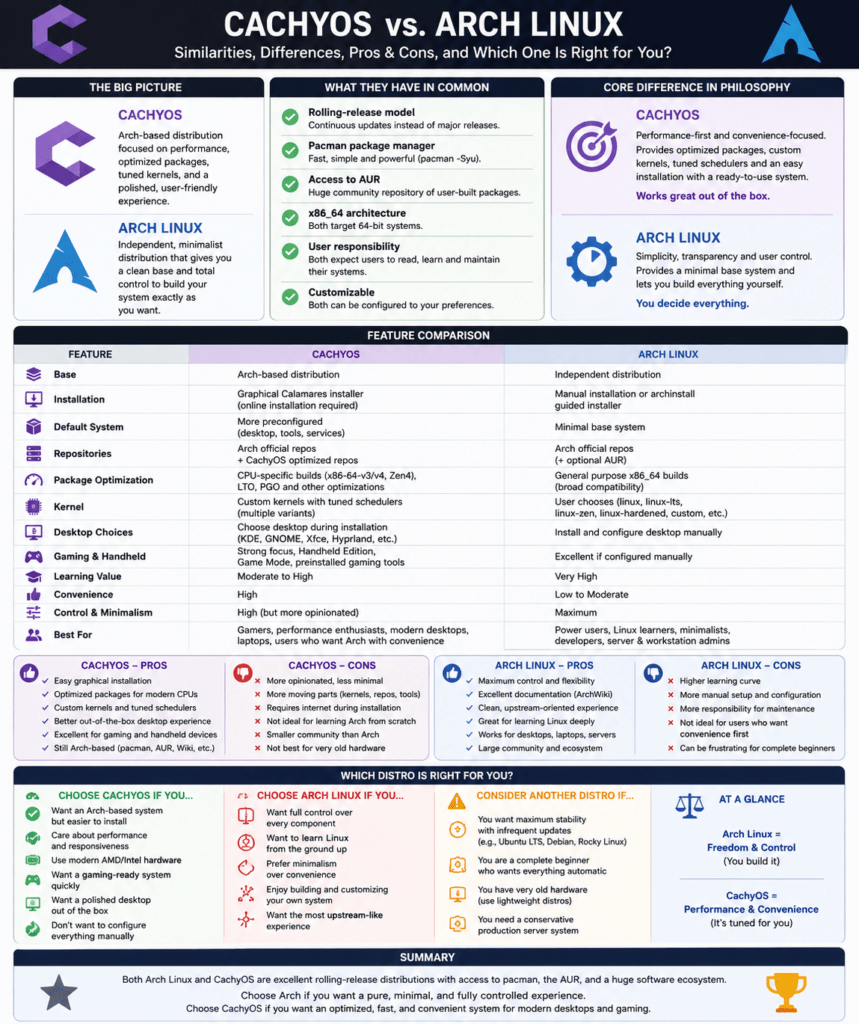
The following diagram shows all this on one page:
Views: 165
