
BizTalk 2020 ESB Toolkit
Introduction
While BizTalk Server 2020 is best known for orchestrating complex message flows and transforming data formats, one of its most powerful — yet sometimes underutilized — components is the Enterprise Service Bus (ESB) Toolkit.
The ESB Toolkit extends BizTalk’s core capabilities, allowing organizations to build loosely coupled, dynamically configurable integration solutions. Instead of hardcoding routing, transformation, and endpoint details into orchestrations, ESB enables policy-driven integration where changes can be made without redeployment.
In this post, we’ll walk through a realistic integration scenario where the ESB Toolkit shines, using code snippets and graphics to illustrate the design.
Scenario: Multi-Format Order Processing with Dynamic Routing
Imagine a retail company that receives purchase orders from multiple partners:
- Partner A sends XML via HTTP POST.
- Partner B sends JSON via Azure Service Bus.
- Partner C sends CSV via SFTP.
The goal:
- Ingest messages from multiple channels.
- Transform all formats to a canonical XML order schema.
- Dynamically route them to different back-end systems based on metadata (partner ID, order type, etc.).
Why ESB Makes Sense Here
Without ESB, we would need separate BizTalk receive locations, orchestrations, and send ports for each partner, with routing logic baked into orchestrations. This makes changes slow and deployment-heavy.
With ESB:
- All routing and transformation rules can be defined in the ESB Management Portal.
- Messages are processed through a generic ESB itinerary that applies transformations and routes dynamically.
- Adding a new partner becomes a configuration change, not a code change.
High-Level Architecture
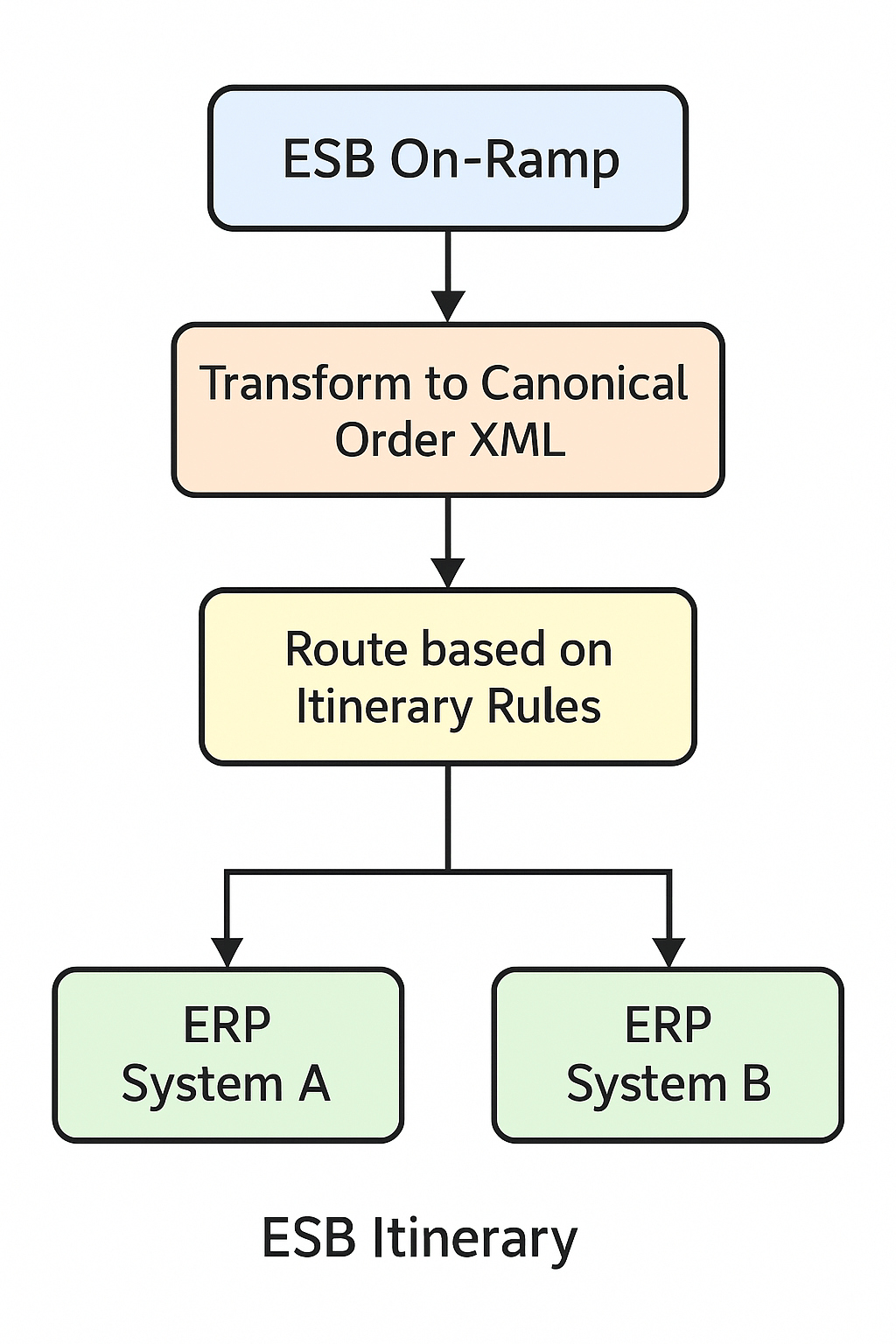
Below is the logical flow:
[ Partner A (XML) ]      [ Partner B (JSON) ]     [ Partner C (CSV) ]
         |                        |                        |
         v                        v                        v
   BizTalk Receive Port    BizTalk Receive Port     BizTalk Receive Port
         |                        |                        |
         +-----------[ ESB On-Ramp Pipeline ]--------------+
                             |
                        ESB Itinerary
                             |
                [ Transform to Canonical Order XML ]
                             |
                  [ Route based on Itinerary Rules ]
                             |
               +-------------+--------------+
               |                            |
    [ ERP System A ]              [ ERP System B ]
Building the Solution in BizTalk 2020 with ESB
1. Creating the Canonical Schema
A canonical order schema acts as the single internal format:
<xs:schema xmlns:xs="http://www.w3.org/2001/XMLSchema"
           targetNamespace="http://retail.example.com/schemas/Order"
           elementFormDefault="qualified">
  <xs:element name="Order">
    <xs:complexType>
      <xs:sequence>
        <xs:element name="PartnerId" type="xs:string" />
        <xs:element name="OrderId" type="xs:string" />
        <xs:element name="OrderDate" type="xs:dateTime" />
        <xs:element name="Items" type="xs:string" />
      </xs:sequence>
    </xs:complexType>
  </xs:element>
</xs:schema>
2. Defining the ESB Itinerary
In the ESB Management Portal:
- Step 1: Message received by an On-Ramp (ESB Receive Pipeline).
- Step 2: Execute a transformation (JSON/CSV/XML → Canonical XML).
- Step 3: Execute routing rules (send to ERP A if
PartnerId=A, else ERP B).
Example Itinerary XML snippet:
<itinerary name="OrderProcessing" version="1.0">
  <services>
    <service name="TransformToCanonical" type="Transform">
      <resolver implementation="BTSBAMappingService">
        <map name="JsonToCanonicalOrderMap"/>
      </resolver>
    </service>
    <service name="DynamicRouting" type="Routing">
      <resolver implementation="BTSBAResolver">
        <udf>
          <partnerId>{xpath(/Order/PartnerId)}</partnerId>
          <destination>{rules:PartnerRouting}</destination>
        </udf>
      </resolver>
    </service>
  </services>
</itinerary>
3. Dynamic Routing in Code
In BizTalk ESB, resolvers define where to send the message. Here’s an example of a custom endpoint resolver:
public class PartnerRoutingResolver : IResolveProvider
{
    public Resolution Resolve(IBaseMessage message, string config)
    {
        string partnerId = ExtractPartnerId(message);
        string destinationUrl;

        switch (partnerId)
        {
            case "A": destinationUrl = "sb://erpA.servicebus.windows.net/orders"; break;
            case "B": destinationUrl = "sb://erpB.servicebus.windows.net/orders"; break;
            default: destinationUrl = "sb://default.servicebus.windows.net/orders"; break;
        }

        Resolution resolution = new Resolution();
        resolution.TransportLocation = destinationUrl;
        resolution.TransportType = "SB-Messaging";

        return resolution;
    }

    private string ExtractPartnerId(IBaseMessage message)
    {
        using (var reader = new StreamReader(message.BodyPart.Data))
        {
            var xml = XDocument.Load(reader);
            return xml.Root.Element("PartnerId")?.Value ?? "Default";
        }
    }
}
This allows BizTalk to decide at runtime where to send the message — without touching the orchestration code.
4. Adding Transformations for Multiple Formats
You’ll need maps to convert each partner format to the canonical schema:
- JSON to Canonical XML Map (via JSON schema + BizTalk Mapper).
- CSV to Canonical XML Map (via flat file schema).
Once defined, the ESB Itinerary applies the correct map automatically based on the metadata in the message context.
Benefits of Using ESB in This Scenario
- Dynamic changes: Add new partners without redeploying orchestrations.
- Centralized configuration: All rules managed via ESB portal.
- Reduced complexity: One generic receive pipeline, one itinerary, multiple dynamic routes.
- Future-proofing: Easier to migrate away from BizTalk later by decoupling integration logic.
Final Thoughts
In complex, multi-partner integration scenarios like our multi-format order processing example, the ESB Toolkit in BizTalk Server 2020 provides flexibility and maintainability that traditional static BizTalk orchestrations can’t match.
By separating configuration from code, ESB enables faster change cycles, reduces deployment risk, and makes integration architectures more adaptable to evolving business needs.
If your BizTalk environment handles multiple sources, multiple formats, and dynamic destinations, the ESB Toolkit should be high on your list of architectural tools — not just as a bridge to the future, but as a core enabler of agile integration today.
Visual ESB Itinerary Diagram
Views: 13
