Onion Architecture with .NET 10: A Simple Practical Example
Introduction
Onion Architecture is an architectural style that puts the domain model at the center of the application. Everything else — APIs, databases, frameworks, external services, logging, messaging — lives in outer layers and depends inward.
The idea was popularized by Jeffrey Palermo. In his original article, Palermo describes Onion Architecture as a way to improve maintainability through separation of concerns, interface-based contracts, and externalized infrastructure. He also points out that it is especially suitable for long-lived business applications with complex behavior, not necessarily for very small websites. (Programming with Palermo)
In this article, we will build a small Task API with .NET 10. .NET 10 is an LTS release and is supported for three years. (Microsoft Learn)
We will use ASP.NET Core Minimal APIs as the outer HTTP layer. Minimal APIs are designed for HTTP APIs with minimal dependencies and are a good fit for small, focused services and microservices. (Microsoft Learn)
The goal is to demonstrate:
Domain-first design
Dependency inversion
Infrastructure as an outer detail
Thin API endpoints
Testable application services
Clear differences compared to Clean Architecture
Problem Statement
We will build a small task management API.
The API supports three operations:
POST   /tasks
GET    /tasks/open
POST   /tasks/{id}/complete
A task has:
Id
Title
IsCompleted
CreatedAt
CompletedAt
The business rules are simple:
A task must have a title.
The title must not be empty.
The title must not be longer than 120 characters.
A task can only be completed once.
A task cannot be completed before it was created.
These rules belong in the domain core, not in the API, not in EF Core, and not in the database.
Architecture / Approach
Onion Architecture is usually visualized as concentric circles:
              ┌──────────────────────────────┐
              │        Presentation/API       │
              │  Minimal APIs, HTTP, JSON     │
              └───────────────┬──────────────┘
                              │
              ┌───────────────▼──────────────┐
              │        Infrastructure         │
              │ Database, repositories, clock │
              └───────────────┬──────────────┘
                              │
              ┌───────────────▼──────────────┐
              │        Application            │
              │ Use cases, commands, DTOs     │
              └───────────────┬──────────────┘
                              │
              ┌───────────────▼──────────────┐
              │          Domain Core          │
              │ Entities, value objects,      │
              │ domain rules, domain contracts│
              └──────────────────────────────┘
The important rule is:
Outer layers depend on inner layers.
Inner layers do not depend on outer layers.
For our example, the solution structure looks like this:
OnionArchitectureNet10
├── src
│   ├── Tasks.Domain
│   ├── Tasks.Application
│   ├── Tasks.Infrastructure
│   └── Tasks.Api
└── tests
    ├── Tasks.Application.Tests
    └── Tasks.Api.Tests
The dependency direction is:
Tasks.Api
   ↓
Tasks.Infrastructure
   ↓
Tasks.Application
   ↓
Tasks.Domain
However, the API can also reference Application directly because it calls use cases:
Tasks.Api ────────────────┐
                          ▼
Tasks.Infrastructure → Tasks.Application → Tasks.Domain
The key is that Tasks.Domain does not reference anything else.
Layer Responsibilities
| Layer | Responsibility | Contains | Must not contain |
|---|---|---|---|
Tasks.Domain | Business model and rules | Entities, value objects, domain exceptions, repository contracts | ASP.NET Core, EF Core, JSON, HTTP |
Tasks.Application | Use cases | Commands, handlers, result types, DTOs | Concrete database code |
Tasks.Infrastructure | Technical implementations | Repository implementations, system clock, persistence adapters | Business rules |
Tasks.Api | HTTP adapter | Minimal API endpoints, DI setup, HTTP response mapping | Domain decisions |
Implementation
1. Create the Solution
mkdir OnionArchitectureNet10
cd OnionArchitectureNet10

dotnet new sln -n OnionArchitectureNet10

mkdir src tests

dotnet new classlib -n Tasks.Domain -o src/Tasks.Domain -f net10.0
dotnet new classlib -n Tasks.Application -o src/Tasks.Application -f net10.0
dotnet new classlib -n Tasks.Infrastructure -o src/Tasks.Infrastructure -f net10.0
dotnet new web -n Tasks.Api -o src/Tasks.Api -f net10.0

dotnet sln add src/Tasks.Domain/Tasks.Domain.csproj
dotnet sln add src/Tasks.Application/Tasks.Application.csproj
dotnet sln add src/Tasks.Infrastructure/Tasks.Infrastructure.csproj
dotnet sln add src/Tasks.Api/Tasks.Api.csproj
Add project references:
dotnet add src/Tasks.Application/Tasks.Application.csproj reference src/Tasks.Domain/Tasks.Domain.csproj

dotnet add src/Tasks.Infrastructure/Tasks.Infrastructure.csproj reference src/Tasks.Domain/Tasks.Domain.csproj
dotnet add src/Tasks.Infrastructure/Tasks.Infrastructure.csproj reference src/Tasks.Application/Tasks.Application.csproj

dotnet add src/Tasks.Api/Tasks.Api.csproj reference src/Tasks.Application/Tasks.Application.csproj
dotnet add src/Tasks.Api/Tasks.Api.csproj reference src/Tasks.Infrastructure/Tasks.Infrastructure.csproj
The domain project has no reference to any other project.
That is the architectural center.
2. Domain Layer
The Domain layer is the innermost onion ring.
It contains the concepts and rules of the business.
It should not know anything about:
HTTP
JSON
Minimal APIs
Controllers
EF Core
SQL
Dependency injection containers
DomainException.cs
namespace Tasks.Domain;

public sealed class DomainException : Exception
{
    public DomainException(string message)
        : base(message)
    {
    }
}
TaskTitle.cs
namespace Tasks.Domain;

public sealed record TaskTitle
{
    public const int MaxLength = 120;

    public string Value { get; }

    private TaskTitle(string value)
    {
        Value = value;
    }

    public static TaskTitle Create(string? value)
    {
        if (string.IsNullOrWhiteSpace(value))
        {
            throw new DomainException("A task title must not be empty.");
        }

        var normalized = value.Trim();

        if (normalized.Length > MaxLength)
        {
            throw new DomainException(
                $"A task title must not be longer than {MaxLength} characters.");
        }

        return new TaskTitle(normalized);
    }

    public override string ToString()
    {
        return Value;
    }
}
TaskTitle is a value object.
Instead of passing raw strings everywhere, we introduce a type that guarantees valid task titles.
That means this is impossible:
var title = TaskTitle.Create(" ");
The domain rejects invalid state at the boundary of the model.
TaskItem.cs
namespace Tasks.Domain;

public sealed class TaskItem
{
    public Guid Id { get; }

    public TaskTitle Title { get; private set; }

    public bool IsCompleted { get; private set; }

    public DateTimeOffset CreatedAt { get; }

    public DateTimeOffset? CompletedAt { get; private set; }

    private TaskItem(
        Guid id,
        TaskTitle title,
        bool isCompleted,
        DateTimeOffset createdAt,
        DateTimeOffset? completedAt)
    {
        Id = id;
        Title = title;
        IsCompleted = isCompleted;
        CreatedAt = createdAt;
        CompletedAt = completedAt;
    }

    public static TaskItem Create(TaskTitle title, DateTimeOffset now)
    {
        return new TaskItem(
            id: Guid.NewGuid(),
            title: title,
            isCompleted: false,
            createdAt: now,
            completedAt: null);
    }

    public void Complete(DateTimeOffset now)
    {
        if (IsCompleted)
        {
            throw new DomainException("The task is already completed.");
        }

        if (now < CreatedAt)
        {
            throw new DomainException("A task cannot be completed before it was created.");
        }

        IsCompleted = true;
        CompletedAt = now;
    }
}
Notice that the properties are mostly read-only from the outside.
This prevents code like this:
task.IsCompleted = true;
Instead, the caller must use the business method:
task.Complete(now);
That is important because Complete protects the rule:
A task can only be completed once.
ITaskRepository.cs
namespace Tasks.Domain;

public interface ITaskRepository
{
    Task AddAsync(TaskItem task, CancellationToken cancellationToken);

    Task<TaskItem?> GetByIdAsync(Guid id, CancellationToken cancellationToken);

    Task<IReadOnlyList<TaskItem>> ListOpenAsync(CancellationToken cancellationToken);

    Task SaveChangesAsync(CancellationToken cancellationToken);
}
In this Onion Architecture variant, the repository interface lives in the Domain layer.
That is a common Onion Architecture approach because the domain core defines the contracts it needs, while the implementation stays in an outer layer.
Important distinction:
The domain owns the repository abstraction.
Infrastructure owns the repository implementation.
The domain does not say whether tasks are stored in:
SQL Server
PostgreSQL
MongoDB
Redis
A file
An in-memory dictionary
It only defines the behavior it needs.
3. Application Layer
The Application layer contains use cases.
It coordinates domain objects and domain contracts.
It does not contain HTTP code or database-specific code.
IClock.cs
namespace Tasks.Application.Abstractions;
public interface IClock
{
DateTimeOffset UtcNow { get; }
}
Time is externalized behind an abstraction.
Why?
Because this is difficult to test:
DateTimeOffset.UtcNow
This is easy to test:
_clock.UtcNow
A unit test can provide a fixed clock.
Error.cs
namespace Tasks.Application.Common;
public sealed record Error(string Code, string Message);
Result.cs
namespace Tasks.Application.Common;
public sealed record Result<T>
{
private Result(bool isSuccess, T? value, Error? error)
{
IsSuccess = isSuccess;
Value = value;
Error = error;
}
public bool IsSuccess { get; }
public bool IsFailure => !IsSuccess;
public T? Value { get; }
public Error? Error { get; }
public static Result<T> Success(T value)
{
return new Result<T>(
isSuccess: true,
value: value,
error: null);
}
public static Result<T> Failure(Error error)
{
return new Result<T>(
isSuccess: false,
value: default,
error: error);
}
}
Expected failures are represented as values.
For example:
Task not found
Invalid title
Task already completed
These are not technical exceptions. They are application results.
TaskDto.cs
using Tasks.Domain;
namespace Tasks.Application.Tasks;
public sealed record TaskDto(
Guid Id,
string Title,
bool IsCompleted,
DateTimeOffset CreatedAt,
DateTimeOffset? CompletedAt)
{
public static TaskDto FromDomain(TaskItem task)
{
return new TaskDto(
Id: task.Id,
Title: task.Title.Value,
IsCompleted: task.IsCompleted,
CreatedAt: task.CreatedAt,
CompletedAt: task.CompletedAt);
}
}
The DTO is not the domain entity.
The application exposes a safe data shape to the outside world without leaking the full domain model.
4. Use Case: Create a Task
CreateTaskCommand.cs
namespace Tasks.Application.Tasks.CreateTask;
public sealed record CreateTaskCommand(string Title);
CreateTaskHandler.cs
using Tasks.Application.Abstractions;
using Tasks.Application.Common;
using Tasks.Domain;
namespace Tasks.Application.Tasks.CreateTask;
public sealed class CreateTaskHandler
{
private readonly ITaskRepository _repository;
private readonly IClock _clock;
public CreateTaskHandler(
ITaskRepository repository,
IClock clock)
{
_repository = repository;
_clock = clock;
}
public async Task<Result<TaskDto>> Handle(
CreateTaskCommand command,
CancellationToken cancellationToken)
{
try
{
var title = TaskTitle.Create(command.Title);
var task = TaskItem.Create(
title: title,
now: _clock.UtcNow);
await _repository.AddAsync(task, cancellationToken);
await _repository.SaveChangesAsync(cancellationToken);
return Result<TaskDto>.Success(TaskDto.FromDomain(task));
}
catch (DomainException exception)
{
return Result<TaskDto>.Failure(
new Error(
Code: "tasks.validation",
Message: exception.Message));
}
}
}
The handler coordinates the use case:
Create title value object
Create task entity
Store task through repository contract
Return DTO
It does not know whether the repository uses a database, a file, or memory.
5. Use Case: Complete a Task
CompleteTaskCommand.cs
namespace Tasks.Application.Tasks.CompleteTask;
public sealed record CompleteTaskCommand(Guid TaskId);
CompleteTaskHandler.cs
using Tasks.Application.Abstractions;
using Tasks.Application.Common;
using Tasks.Domain;
namespace Tasks.Application.Tasks.CompleteTask;
public sealed class CompleteTaskHandler
{
private readonly ITaskRepository _repository;
private readonly IClock _clock;
public CompleteTaskHandler(
ITaskRepository repository,
IClock clock)
{
_repository = repository;
_clock = clock;
}
public async Task<Result<TaskDto>> Handle(
CompleteTaskCommand command,
CancellationToken cancellationToken)
{
var task = await _repository.GetByIdAsync(
command.TaskId,
cancellationToken);
if (task is null)
{
return Result<TaskDto>.Failure(
new Error(
Code: "tasks.not_found",
Message: "The task was not found."));
}
try
{
task.Complete(_clock.UtcNow);
await _repository.SaveChangesAsync(cancellationToken);
return Result<TaskDto>.Success(TaskDto.FromDomain(task));
}
catch (DomainException exception)
{
return Result<TaskDto>.Failure(
new Error(
Code: "tasks.validation",
Message: exception.Message));
}
}
}
The important line is:
task.Complete(_clock.UtcNow);
The handler does not change properties directly.
It asks the domain model to perform a business operation.
That keeps the rule inside the domain.
6. Use Case: Get Open Tasks
GetOpenTasksHandler.cs
using Tasks.Domain;
namespace Tasks.Application.Tasks.GetOpenTasks;
public sealed class GetOpenTasksHandler
{
private readonly ITaskRepository _repository;
public GetOpenTasksHandler(ITaskRepository repository)
{
_repository = repository;
}
public async Task<IReadOnlyList<TaskDto>> Handle(
CancellationToken cancellationToken)
{
var tasks = await _repository.ListOpenAsync(cancellationToken);
return tasks
.Select(TaskDto.FromDomain)
.ToList();
}
}
This is a simple query use case.
Even here, the Application layer depends on the repository abstraction, not on infrastructure.
7. Infrastructure Layer
Infrastructure is an outer onion ring.
It implements technical details.
For this example, we use an in-memory implementation.
Later, we could replace it with:
EF Core
Dapper
MongoDB
PostgreSQL
SQL Server
Redis
A remote API
without changing the Domain layer.
SystemClock.cs
using Tasks.Application.Abstractions;
namespace Tasks.Infrastructure;
public sealed class SystemClock : IClock
{
public DateTimeOffset UtcNow => DateTimeOffset.UtcNow;
}
InMemoryTaskRepository.cs
using Tasks.Domain;
namespace Tasks.Infrastructure;
public sealed class InMemoryTaskRepository : ITaskRepository
{
private readonly object _gate = new();
private readonly Dictionary<Guid, TaskItem> _tasks = new();
public Task AddAsync(TaskItem task, CancellationToken cancellationToken)
{
cancellationToken.ThrowIfCancellationRequested();
lock (_gate)
{
_tasks.Add(task.Id, task);
}
return Task.CompletedTask;
}
public Task<TaskItem?> GetByIdAsync(Guid id, CancellationToken cancellationToken)
{
cancellationToken.ThrowIfCancellationRequested();
lock (_gate)
{
_tasks.TryGetValue(id, out var task);
return Task.FromResult(task);
}
}
public Task<IReadOnlyList<TaskItem>> ListOpenAsync(
CancellationToken cancellationToken)
{
cancellationToken.ThrowIfCancellationRequested();
lock (_gate)
{
IReadOnlyList<TaskItem> result = _tasks
.Values
.Where(task => !task.IsCompleted)
.OrderBy(task => task.CreatedAt)
.ToList();
return Task.FromResult(result);
}
}
public Task SaveChangesAsync(CancellationToken cancellationToken)
{
cancellationToken.ThrowIfCancellationRequested();
// Nothing to persist in the in-memory version.
// An EF Core implementation would call DbContext.SaveChangesAsync here.
return Task.CompletedTask;
}
}
The repository implementation depends on the domain contract:
public sealed class InMemoryTaskRepository : ITaskRepository
This is dependency inversion in action.
The domain does not depend on infrastructure.
Infrastructure depends on the domain.
8. API Layer
The API is the outermost layer.
Its responsibility is simple:
Receive HTTP requests
Map requests to application commands
Call application handlers
Map application results to HTTP responses
It should not contain business rules.
CreateTaskRequest.cs
namespace Tasks.Api.Contracts;
public sealed record CreateTaskRequest(string Title);
TaskEndpoints.cs
using Tasks.Api.Contracts;
using Tasks.Application.Common;
using Tasks.Application.Tasks;
using Tasks.Application.Tasks.CompleteTask;
using Tasks.Application.Tasks.CreateTask;
using Tasks.Application.Tasks.GetOpenTasks;
namespace Tasks.Api;
public static class TaskEndpoints
{
public static IEndpointRouteBuilder MapTaskEndpoints(
this IEndpointRouteBuilder app)
{
var group = app
.MapGroup("/tasks")
.WithTags("Tasks");
group.MapPost(
"/",
async (
CreateTaskRequest request,
CreateTaskHandler handler,
CancellationToken cancellationToken) =>
{
var result = await handler.Handle(
new CreateTaskCommand(request.Title),
cancellationToken);
return result.ToHttpCreatedResult();
});
group.MapGet(
"/open",
async (
GetOpenTasksHandler handler,
CancellationToken cancellationToken) =>
{
var tasks = await handler.Handle(cancellationToken);
return Results.Ok(tasks);
});
group.MapPost(
"/{id:guid}/complete",
async (
Guid id,
CompleteTaskHandler handler,
CancellationToken cancellationToken) =>
{
var result = await handler.Handle(
new CompleteTaskCommand(id),
cancellationToken);
return result.ToHttpOkResult();
});
return app;
}
private static IResult ToHttpCreatedResult(
this Result<TaskDto> result)
{
if (result.IsSuccess && result.Value is not null)
{
return Results.Created(
$"/tasks/{result.Value.Id}",
result.Value);
}
return ToProblemResult(result.Error);
}
private static IResult ToHttpOkResult(
this Result<TaskDto> result)
{
if (result.IsSuccess && result.Value is not null)
{
return Results.Ok(result.Value);
}
return ToProblemResult(result.Error);
}
private static IResult ToProblemResult(Error? error)
{
if (error is null)
{
return Results.Problem(
title: "Unexpected error",
statusCode: StatusCodes.Status500InternalServerError);
}
return error.Code switch
{
"tasks.not_found" => Results.NotFound(new
{
error.Code,
error.Message
}),
"tasks.validation" => Results.BadRequest(new
{
error.Code,
error.Message
}),
_ => Results.Problem(
title: error.Message,
statusCode: StatusCodes.Status500InternalServerError)
};
}
}
The API does not check whether a task title is valid.
It does not check whether a task is already completed.
It delegates to the Application layer, which delegates business decisions to the Domain layer.
That is exactly what we want.
Program.cs
using Tasks.Api;
using Tasks.Application.Abstractions;
using Tasks.Application.Tasks.CompleteTask;
using Tasks.Application.Tasks.CreateTask;
using Tasks.Application.Tasks.GetOpenTasks;
using Tasks.Domain;
using Tasks.Infrastructure;
var builder = WebApplication.CreateBuilder(args);
builder.Services.AddOpenApi();
builder.Services.AddScoped<CreateTaskHandler>();
builder.Services.AddScoped<CompleteTaskHandler>();
builder.Services.AddScoped<GetOpenTasksHandler>();
builder.Services.AddSingleton<IClock, SystemClock>();
builder.Services.AddSingleton<ITaskRepository, InMemoryTaskRepository>();
var app = builder.Build();
if (app.Environment.IsDevelopment())
{
app.MapOpenApi();
}
app.MapTaskEndpoints();
app.Run();
public partial class Program;
The composition root is in the outermost layer.
That is where concrete infrastructure is connected to inner abstractions:
builder.Services.AddSingleton<ITaskRepository, InMemoryTaskRepository>();
The Domain layer does not know that this registration exists.
9. Try the API
Start the API:
dotnet run --project src/Tasks.Api
Create a task:
curl -i \
-X POST http://localhost:5000/tasks \
-H "Content-Type: application/json" \
-d '{"title":"Learn Onion Architecture with .NET 10"}'
Example response:
{
"id": "f51a7c45-6d1f-4c5d-a4ef-4f93d92d2b99",
"title": "Learn Onion Architecture with .NET 10",
"isCompleted": false,
"createdAt": "2026-05-10T12:00:00+00:00",
"completedAt": null
}
Get open tasks:
curl http://localhost:5000/tasks/open
Complete a task:
curl -i \
-X POST http://localhost:5000/tasks/f51a7c45-6d1f-4c5d-a4ef-4f93d92d2b99/complete
Try an invalid task:
curl -i \
-X POST http://localhost:5000/tasks \
-H "Content-Type: application/json" \
-d '{"title":" "}'
Example response:
{
"code": "tasks.validation",
"message": "A task title must not be empty."
}
Tests
1. Create Test Projects
dotnet new xunit -n Tasks.Application.Tests -o tests/Tasks.Application.Tests -f net10.0
dotnet new xunit -n Tasks.Api.Tests -o tests/Tasks.Api.Tests -f net10.0
dotnet sln add tests/Tasks.Application.Tests/Tasks.Application.Tests.csproj
dotnet sln add tests/Tasks.Api.Tests/Tasks.Api.Tests.csproj
dotnet add tests/Tasks.Application.Tests/Tasks.Application.Tests.csproj reference src/Tasks.Application/Tasks.Application.csproj
dotnet add tests/Tasks.Application.Tests/Tasks.Application.Tests.csproj reference src/Tasks.Domain/Tasks.Domain.csproj
dotnet add tests/Tasks.Api.Tests/Tasks.Api.Tests.csproj reference src/Tasks.Api/Tasks.Api.csproj
dotnet add tests/Tasks.Api.Tests/Tasks.Api.Tests.csproj package Microsoft.AspNetCore.Mvc.Testing
2. Domain Test: Task Title Validation
using Tasks.Domain;
namespace Tasks.Application.Tests;
public sealed class TaskTitleTests
{
[Fact]
public void Create_WithValidTitle_ReturnsTaskTitle()
{
var title = TaskTitle.Create(" Learn Onion Architecture ");
Assert.Equal("Learn Onion Architecture", title.Value);
}
[Fact]
public void Create_WithEmptyTitle_ThrowsDomainException()
{
var exception = Assert.Throws<DomainException>(
() => TaskTitle.Create(" "));
Assert.Equal("A task title must not be empty.", exception.Message);
}
[Fact]
public void Create_WithTooLongTitle_ThrowsDomainException()
{
var tooLongTitle = new string('A', TaskTitle.MaxLength + 1);
var exception = Assert.Throws<DomainException>(
() => TaskTitle.Create(tooLongTitle));
Assert.Contains("must not be longer", exception.Message);
}
}
This test touches only the domain.
No API.
No database.
No dependency injection.
3. Domain Test: Complete Task
using Tasks.Domain;
namespace Tasks.Application.Tests;
public sealed class TaskItemTests
{
[Fact]
public void Complete_WhenTaskIsOpen_CompletesTask()
{
var createdAt = new DateTimeOffset(2026, 5, 10, 10, 0, 0, TimeSpan.Zero);
var completedAt = new DateTimeOffset(2026, 5, 10, 12, 0, 0, TimeSpan.Zero);
var task = TaskItem.Create(
TaskTitle.Create("Write article"),
createdAt);
task.Complete(completedAt);
Assert.True(task.IsCompleted);
Assert.Equal(completedAt, task.CompletedAt);
}
[Fact]
public void Complete_WhenTaskIsAlreadyCompleted_ThrowsDomainException()
{
var createdAt = new DateTimeOffset(2026, 5, 10, 10, 0, 0, TimeSpan.Zero);
var completedAt = new DateTimeOffset(2026, 5, 10, 12, 0, 0, TimeSpan.Zero);
var task = TaskItem.Create(
TaskTitle.Create("Write article"),
createdAt);
task.Complete(completedAt);
var exception = Assert.Throws<DomainException>(
() => task.Complete(completedAt.AddMinutes(5)));
Assert.Equal("The task is already completed.", exception.Message);
}
}
This test proves that business rules are protected by the domain model itself.
4. Application Test: Create Task
using Tasks.Application.Abstractions;
using Tasks.Application.Tasks.CreateTask;
using Tasks.Domain;
namespace Tasks.Application.Tests;
public sealed class CreateTaskHandlerTests
{
[Fact]
public async Task Handle_WithValidTitle_CreatesTask()
{
var now = new DateTimeOffset(2026, 5, 10, 12, 0, 0, TimeSpan.Zero);
var repository = new FakeTaskRepository();
var clock = new FixedClock(now);
var handler = new CreateTaskHandler(repository, clock);
var result = await handler.Handle(
new CreateTaskCommand("Learn Onion Architecture"),
CancellationToken.None);
Assert.True(result.IsSuccess);
Assert.NotNull(result.Value);
Assert.Equal("Learn Onion Architecture", result.Value.Title);
Assert.False(result.Value.IsCompleted);
Assert.Equal(now, result.Value.CreatedAt);
Assert.NotNull(repository.AddedTask);
}
[Fact]
public async Task Handle_WithEmptyTitle_ReturnsValidationError()
{
var repository = new FakeTaskRepository();
var clock = new FixedClock(DateTimeOffset.UtcNow);
var handler = new CreateTaskHandler(repository, clock);
var result = await handler.Handle(
new CreateTaskCommand(" "),
CancellationToken.None);
Assert.True(result.IsFailure);
Assert.Equal("tasks.validation", result.Error?.Code);
Assert.Null(repository.AddedTask);
}
private sealed class FixedClock : IClock
{
public FixedClock(DateTimeOffset utcNow)
{
UtcNow = utcNow;
}
public DateTimeOffset UtcNow { get; }
}
private sealed class FakeTaskRepository : ITaskRepository
{
private readonly Dictionary<Guid, TaskItem> _tasks = new();
public TaskItem? AddedTask { get; private set; }
public Task AddAsync(TaskItem task, CancellationToken cancellationToken)
{
AddedTask = task;
_tasks.Add(task.Id, task);
return Task.CompletedTask;
}
public Task<TaskItem?> GetByIdAsync(Guid id, CancellationToken cancellationToken)
{
_tasks.TryGetValue(id, out var task);
return Task.FromResult(task);
}
public Task<IReadOnlyList<TaskItem>> ListOpenAsync(
CancellationToken cancellationToken)
{
IReadOnlyList<TaskItem> result = _tasks
.Values
.Where(task => !task.IsCompleted)
.ToList();
return Task.FromResult(result);
}
public Task SaveChangesAsync(CancellationToken cancellationToken)
{
return Task.CompletedTask;
}
}
}
The use case test does not need infrastructure.
That is one of the main benefits of Onion Architecture.
5. Application Test: Complete Task
using Tasks.Application.Abstractions;
using Tasks.Application.Tasks.CompleteTask;
using Tasks.Domain;
namespace Tasks.Application.Tests;
public sealed class CompleteTaskHandlerTests
{
[Fact]
public async Task Handle_WithExistingTask_CompletesTask()
{
var createdAt = new DateTimeOffset(2026, 5, 10, 10, 0, 0, TimeSpan.Zero);
var completedAt = new DateTimeOffset(2026, 5, 10, 12, 0, 0, TimeSpan.Zero);
var task = TaskItem.Create(
TaskTitle.Create("Write article"),
createdAt);
var repository = new FakeTaskRepository(task);
var clock = new FixedClock(completedAt);
var handler = new CompleteTaskHandler(repository, clock);
var result = await handler.Handle(
new CompleteTaskCommand(task.Id),
CancellationToken.None);
Assert.True(result.IsSuccess);
Assert.NotNull(result.Value);
Assert.True(result.Value.IsCompleted);
Assert.Equal(completedAt, result.Value.CompletedAt);
}
[Fact]
public async Task Handle_WithUnknownTask_ReturnsNotFound()
{
var repository = new FakeTaskRepository();
var clock = new FixedClock(DateTimeOffset.UtcNow);
var handler = new CompleteTaskHandler(repository, clock);
var result = await handler.Handle(
new CompleteTaskCommand(Guid.NewGuid()),
CancellationToken.None);
Assert.True(result.IsFailure);
Assert.Equal("tasks.not_found", result.Error?.Code);
}
private sealed class FixedClock : IClock
{
public FixedClock(DateTimeOffset utcNow)
{
UtcNow = utcNow;
}
public DateTimeOffset UtcNow { get; }
}
private sealed class FakeTaskRepository : ITaskRepository
{
private readonly Dictionary<Guid, TaskItem> _tasks = new();
public FakeTaskRepository(params TaskItem[] tasks)
{
foreach (var task in tasks)
{
_tasks.Add(task.Id, task);
}
}
public Task AddAsync(TaskItem task, CancellationToken cancellationToken)
{
_tasks.Add(task.Id, task);
return Task.CompletedTask;
}
public Task<TaskItem?> GetByIdAsync(Guid id, CancellationToken cancellationToken)
{
_tasks.TryGetValue(id, out var task);
return Task.FromResult(task);
}
public Task<IReadOnlyList<TaskItem>> ListOpenAsync(
CancellationToken cancellationToken)
{
IReadOnlyList<TaskItem> result = _tasks
.Values
.Where(task => !task.IsCompleted)
.ToList();
return Task.FromResult(result);
}
public Task SaveChangesAsync(CancellationToken cancellationToken)
{
return Task.CompletedTask;
}
}
}
6. API Integration Test
using System.Net;
using System.Net.Http.Json;
using Microsoft.AspNetCore.Mvc.Testing;
using Tasks.Application.Tasks;
namespace Tasks.Api.Tests;
public sealed class TaskApiTests : IClassFixture<WebApplicationFactory<Program>>
{
private readonly HttpClient _client;
public TaskApiTests(WebApplicationFactory<Program> factory)
{
_client = factory.CreateClient();
}
[Fact]
public async Task PostTasks_WithValidTitle_ReturnsCreatedTask()
{
var response = await _client.PostAsJsonAsync(
"/tasks",
new
{
Title = "Test Onion Architecture API"
});
Assert.Equal(HttpStatusCode.Created, response.StatusCode);
var task = await response.Content.ReadFromJsonAsync<TaskDto>();
Assert.NotNull(task);
Assert.Equal("Test Onion Architecture API", task.Title);
Assert.False(task.IsCompleted);
}
[Fact]
public async Task PostTasks_WithEmptyTitle_ReturnsBadRequest()
{
var response = await _client.PostAsJsonAsync(
"/tasks",
new
{
Title = " "
});
Assert.Equal(HttpStatusCode.BadRequest, response.StatusCode);
}
}
The integration test verifies that the HTTP adapter works.
The domain and application tests verify the core behavior.
That separation is exactly what Onion Architecture encourages.
Deployment / Operations
Publish Locally
dotnet publish src/Tasks.Api/Tasks.Api.csproj \
-c Release \
-o ./publish \
/p:UseAppHost=false
Run the published app:
dotnet ./publish/Tasks.Api.dll
Dockerfile
FROM mcr.microsoft.com/dotnet/sdk:10.0 AS build
WORKDIR /src
COPY . .
RUN dotnet restore
RUN dotnet publish src/Tasks.Api/Tasks.Api.csproj \
-c Release \
-o /app/publish \
/p:UseAppHost=false
FROM mcr.microsoft.com/dotnet/aspnet:10.0 AS runtime
WORKDIR /app
ENV ASPNETCORE_URLS=http://+:8080
COPY --from=build /app/publish .
EXPOSE 8080
ENTRYPOINT ["dotnet", "Tasks.Api.dll"]
Build the image:
docker build -t onion-architecture-net10 .
Run the container:
docker run --rm -p 8080:8080 onion-architecture-net10
Test it:
curl http://localhost:8080/tasks/open
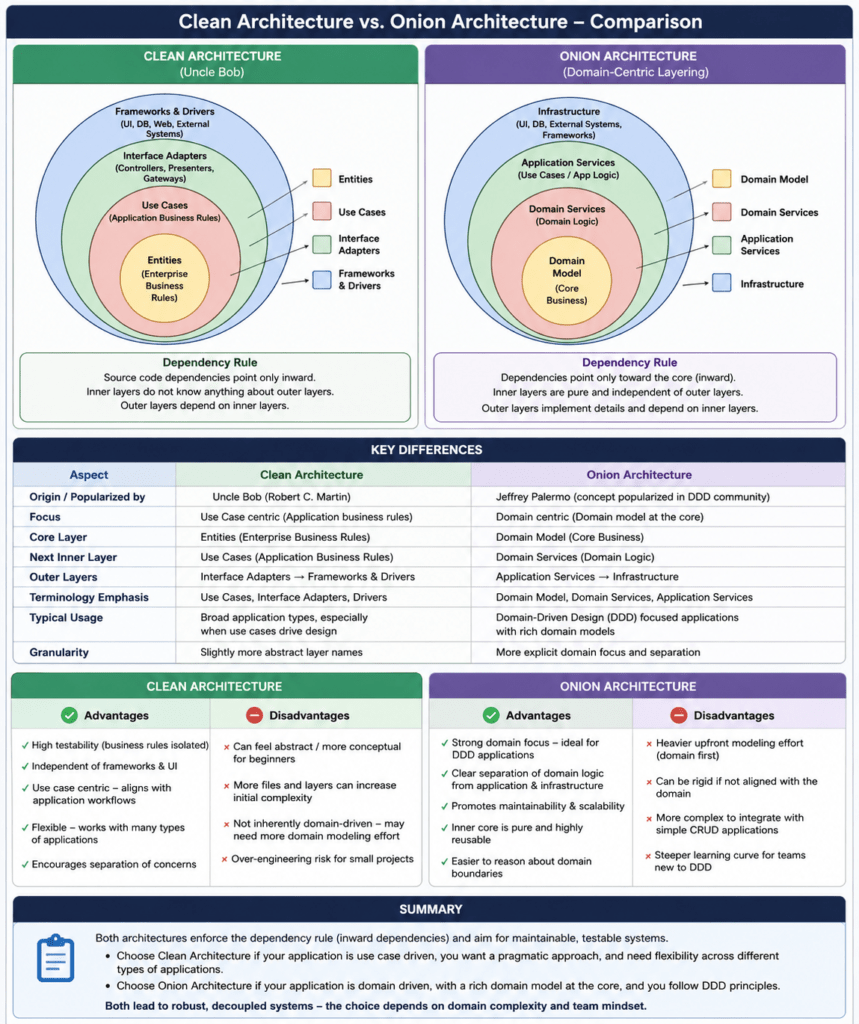
Onion Architecture vs Clean Architecture
Onion Architecture and Clean Architecture are very similar.
Both aim to protect business logic from technical details.
Both use dependency inversion.
Both place frameworks, databases, and UI at the outside.
But there are some practical differences in emphasis.
Conceptual Comparison
| Topic | Onion Architecture | Clean Architecture |
|---|---|---|
| Main metaphor | Concentric onion rings | Concentric circles with use cases |
| Center | Domain model | Entities and enterprise business rules |
| Strongest emphasis | Domain model and dependency inversion | Use cases and boundaries |
| Repository interfaces | Often placed in the domain/core | Often placed in application/use-case layer |
| Application services | Surround the domain | Use cases are a central architectural concept |
| Naming | Domain, Application, Infrastructure, UI/API | Entities, Use Cases, Interface Adapters, Frameworks |
| Typical .NET project names | Domain, Application, Infrastructure, Api | often the same in practice |
| Original motivation | Avoid coupling to infrastructure and traditional layered architecture | Separate policy from details across application boundaries |
Difference 1: Domain-Centric vs Use-Case-Centric
Onion Architecture usually feels more domain-centric.
The center is the domain model:
TaskItem
TaskTitle
DomainException
ITaskRepository
Clean Architecture often feels more use-case-centric.
The use cases are very explicit:
CreateTask
CompleteTask
GetOpenTasks
In real .NET projects, both styles often end up with the same project structure:
Domain
Application
Infrastructure
Api
The difference is mostly about emphasis.
Difference 2: Where Repository Interfaces Live
In this Onion example, the repository contract lives in the Domain layer:
namespace Tasks.Domain;

public interface ITaskRepository
{
    Task AddAsync(TaskItem task, CancellationToken cancellationToken);

    Task<TaskItem?> GetByIdAsync(Guid id, CancellationToken cancellationToken);

    Task<IReadOnlyList<TaskItem>> ListOpenAsync(CancellationToken cancellationToken);

    Task SaveChangesAsync(CancellationToken cancellationToken);
}
In many Clean Architecture examples, the same interface would live in the Application layer:
namespace Tasks.Application.Abstractions;

public interface ITaskRepository
{
    // ...
}
Both approaches can be valid.
A useful rule of thumb:
| Interface type | Good place |
|---|---|
| Repository for domain aggregate | Domain or Application |
| Email sender | Application |
| Payment gateway | Application |
| Current user context | Application |
| Clock/time provider | Application or Domain services |
| Domain policy interface | Domain |
For this example, placing ITaskRepository in the Domain layer makes the Onion style more visible.
Difference 3: Domain Services Are More Natural in Onion Architecture
In Onion Architecture, the domain ring can contain more than entities.
It can also contain domain services.
For example, imagine a more complex rule:
A user may only have five open tasks at the same time.
That rule might require checking existing open tasks.
You could introduce a domain service:
namespace Tasks.Domain;

public sealed class TaskCreationPolicy
{
    public const int MaxOpenTasksPerUser = 5;

    public void EnsureCanCreateTask(int currentOpenTaskCount)
    {
        if (currentOpenTaskCount >= MaxOpenTasksPerUser)
        {
            throw new DomainException(
                $"A user cannot have more than {MaxOpenTasksPerUser} open tasks.");
        }
    }
}
Then the application handler could use it:
var openTasks = await _repository.ListOpenAsync(cancellationToken);

var policy = new TaskCreationPolicy();

policy.EnsureCanCreateTask(openTasks.Count);
This keeps business rules close to the domain language.
Advantages of Onion Architecture
1. Strong Domain Focus
The domain model is the center of the system.
That encourages developers to ask:
What are the business concepts?
What rules must always be true?
Which objects protect these rules?
This is much better than starting with database tables or HTTP endpoints.
2. Infrastructure Is Replaceable
The application uses this:
ITaskRepository
The API registers this:
builder.Services.AddSingleton<ITaskRepository, InMemoryTaskRepository>();
Later, this can become:
builder.Services.AddScoped<ITaskRepository, EfCoreTaskRepository>();
The use cases do not need to change.
3. Better Testability
Domain tests are simple:
var task = TaskItem.Create(TaskTitle.Create("Test"), createdAt);

task.Complete(completedAt);

Assert.True(task.IsCompleted);
Application tests can use fake repositories:
var repository = new FakeTaskRepository();
var clock = new FixedClock(now);

var handler = new CreateTaskHandler(repository, clock);
No web server.
No database.
No Docker container.
No network dependency.
4. Framework Independence
The core does not care whether the outer layer is:
ASP.NET Core Minimal API
ASP.NET Core MVC
gRPC
Azure Functions
Worker Service
Console application
Blazor
Message consumer
The same use case can be called from all of them.
5. Long-Term Maintainability
Onion Architecture is especially useful when the application is expected to live for years.
The database may change.
The API style may change.
A message broker may be added.
A mobile app may need the same use cases.
The domain core remains stable.
Disadvantages of Onion Architecture
1. More Initial Structure
For very small CRUD applications, this can feel heavy:
Domain project
Application project
Infrastructure project
API project
DTOs
Handlers
Interfaces
Dependency injection setup
If the application only reads and writes simple tables, Onion Architecture may be more structure than necessary.
2. More Files and Indirection
Instead of one endpoint directly writing to a database, you now have:
Endpoint
Command
Handler
Repository interface
Repository implementation
Domain entity
DTO
Result type
That is more code.
The benefit appears when the business logic grows.
3. Requires Discipline
The architecture only works if the team respects the dependency direction.
This is bad:
// Do not do this inside the Domain project.
using Microsoft.EntityFrameworkCore;
This is also bad:
// Do not put HTTP logic into the Application layer.
return Results.BadRequest();
The layers must stay clean.
4. Can Become Ceremony Without Real Domain Logic
If every feature is just:
Create record
Read record
Update record
Delete record
then rich domain modeling may not add much value.
In that case, a simpler vertical slice or transaction script approach might be more pragmatic.
When Should You Use Onion Architecture?
Onion Architecture is a good fit when:
The application has important business rules.
The domain model is expected to evolve.
You need strong automated testing.
Infrastructure may change over time.
Multiple adapters may call the same use cases.
The system will live for several years.
It may be overkill when:
The app is a small CRUD admin tool.
The domain logic is minimal.
The database schema is the main model.
The application is short-lived.
The team is small and needs fast delivery above architectural separation.
Practical Recommendation for .NET Projects
For many .NET applications, this structure works well:
src
├── MyApp.Domain
├── MyApp.Application
├── MyApp.Infrastructure
└── MyApp.Api
Use the Domain project for:
Entities
Value objects
Domain exceptions
Domain services
Domain contracts when they represent domain concepts
Use the Application project for:
Use cases
Commands
Queries
Handlers
Application services
DTOs
Result types
Ports for external systems
Use the Infrastructure project for:
EF Core
Dapper
Repositories
External API clients
File storage
Email providers
System clock implementation
Message broker adapters
Use the API project for:
Minimal APIs
Controllers
Authentication setup
OpenAPI setup
HTTP request/response mapping
Dependency injection composition
Summary
Onion Architecture puts the domain model at the center of the application.
In this .NET 10 example, the structure looked like this:
Tasks.Domain
Tasks.Application
Tasks.Infrastructure
Tasks.Api
The most important dependency rule is:
Outer layers depend on inner layers.
Inner layers never depend on outer layers.
The Domain layer contains the business rules:
A task title must be valid.
A task can only be completed once.
A task cannot be completed before it was created.
The Application layer coordinates use cases:
CreateTaskHandler
CompleteTaskHandler
GetOpenTasksHandler
The Infrastructure layer implements technical details:
InMemoryTaskRepository
SystemClock
The API layer translates HTTP requests into application calls:
POST /tasks
GET /tasks/open
POST /tasks/{id}/complete
Compared to Clean Architecture, Onion Architecture puts even more conceptual emphasis on the domain core and the idea that infrastructure must be pushed outward. Clean Architecture usually emphasizes use cases and boundary interfaces more explicitly. In practice, both approaches often lead to a very similar .NET solution structure.
The main benefit is maintainability:
Business logic stays protected.
Infrastructure remains replaceable.
Tests become easier.
The system can evolve without constantly rewriting the core.
The main cost is additional structure and discipline.
For small CRUD applications, Onion Architecture may be too much. For long-lived business applications with meaningful domain rules, it is a strong and practical architectural choice.
I’ve put all of this into the following diagram:
Views: 25